Universal wishlist
What Is a Universal Wishlist?
By Carlos Tenor · Published 2026-06-17 · Last reviewed 2026-11-05
A universal wishlist is a list that works across stores. Instead of being tied to Amazon, Target, Etsy, or one brand, it lets you save product links from many places and share one link.
Create a free universal wishlistExample wishlist · Three stores
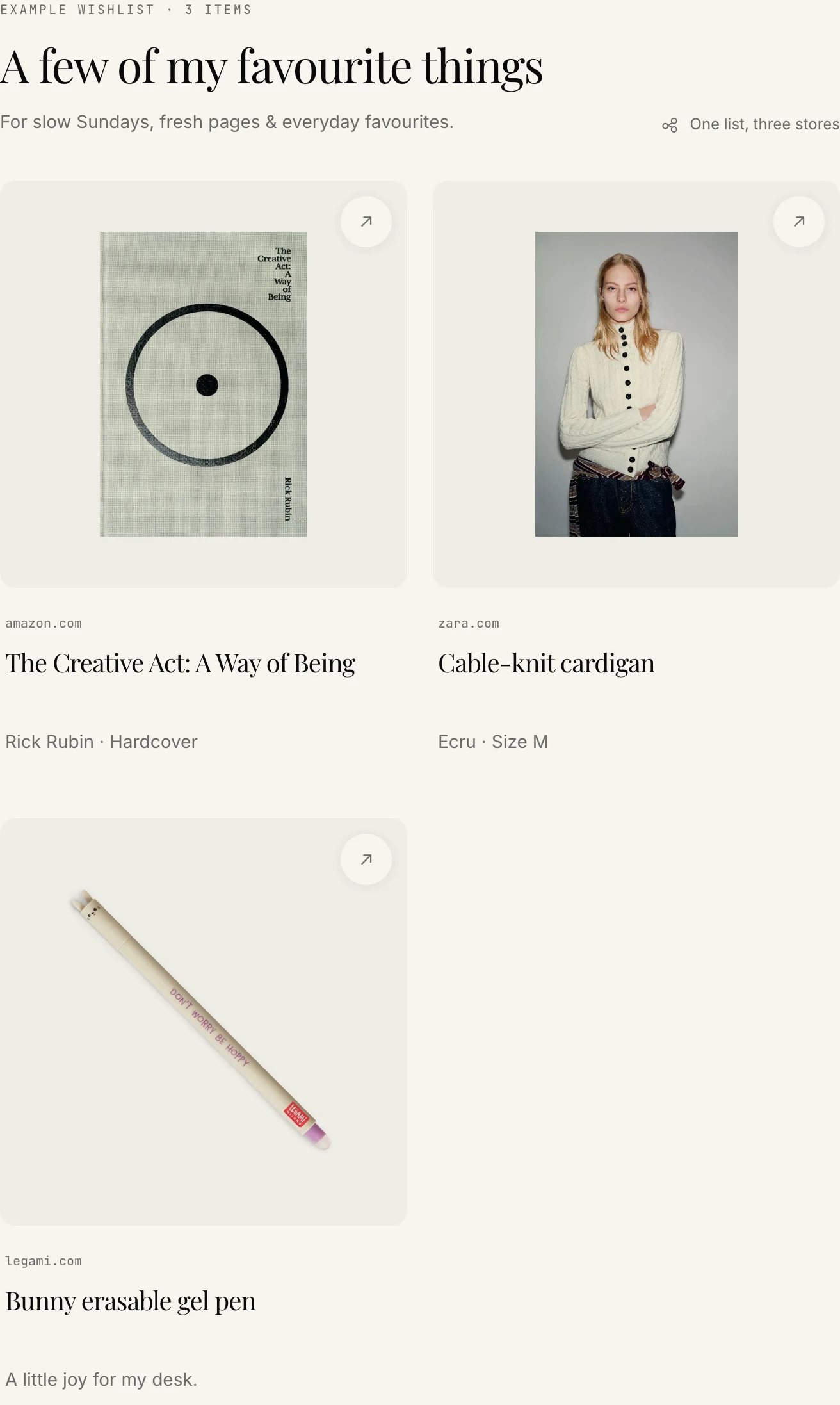
See a wishlist before you make one
A book, a cardigan and a little something for your desk. Open this read-only demo to see how product links and notes sit together.
Why store-only wishlists break down
Store wishlists are useful when every gift comes from that store. When desired products span marketplaces, brand sites, independent shops, or local retailers, a universal list can keep those source links together.
A universal wish list keeps those links together. It is especially useful for birthdays, Christmas, weddings, baby registries, group gifts, and personal “someday” lists.
What a universal wishlist should include
- Multi-site product links so people can open the exact public source page you chose.
- Product name, price, and image so the list is easy to scan.
- Manual editing of the name, displayed price, notes, and URL because some stores hide metadata or change prices. The current web interface does not offer manual image editing.
- One public-by-link URL that guests can open without creating an account.
- Separate lists for different occasions, people, or planning projects.
Universal wishlist examples
A family Christmas list
Add gifts from Amazon, Etsy, toy shops, bookstores, and clothing brands, then share one link with relatives.
A birthday wish list
Keep exact gift links in one place so friends do not need to guess size, color, model, or store.
A personal shopping list
Save future purchases from many retailers and come back later when you are ready to decide.
Do you need a universal wishlist button?
You can use QuickWishlist in your browser without installing a button or an extension. Open the product’s public page, copy its URL, open your wishlist, and paste the URL into the add-item field. Repeat with products from other stores.
Check the saved details and add notes for sizes or variants before sharing. The step-by-step guide to making a wishlist from multiple sites shows how to combine three stores in one list.
Build a useful list before adding products
Here is a worked planning example: a birthday list with a book from a bookshop, a handmade mug from a marketplace, and a jacket from a brand store. These are illustrative choices, not product recommendations or current prices.
- Choose one purpose. Name the list “Birthday ideas” and keep your personal shopping research in a separate list. That makes it clear which links are intended for gifts.
- Offer a range of budgets. Start with a modest option, a middle option, and an optional larger gift. A book, a mug and a jacket can serve different budgets; check actual prices before deciding.
- Write the non-negotiables. The book needs an edition, the mug a colour, and the jacket a size. Put these in each item’s notes because a link may reopen with a default variant.
- Allow substitutions where useful. “Any plain blue mug is fine” is a different instruction from “This exact hardcover edition, please.” Make that distinction explicit.
- Decide how people will coordinate. QuickWishlist has no claiming or reservation feature. If avoiding duplicate gifts matters, ask one person to coordinate purchases outside the list.
- Review the sharing boundary. Anyone with the URL can view the list. Leave out your address, a child’s full name, medical details, or anything you would not want forwarded.
A copyable item-note template
Use the fields you need in the item’s notes. They are buying instructions, not automatic controls or filters.
Exact option: medium, navy, regular fit
Alternative: black is fine; please keep the same size
Priority: useful idea, no pressure to buy
Before ordering: check delivery date and returns at the shop
Do not put a delivery address in public-by-link notes. Send it separately to the person who needs it.
Choose the workflow that fits the job
- One retailer and its specific benefits
- A retailer’s own list may be enough. Check that retailer’s current terms for any returns, delivery, or registry benefits; a link saved in QuickWishlist does not confer those benefits.
- Several stores, one readable link
- A universal list suits this job. QuickWishlist is currently free and lets the owner edit names, displayed prices, notes and links; viewing a shared list needs no account.
- Private collaboration, reserved gifts or shared payments
- Those needs require another workflow. QuickWishlist has no password-protected list mode, collaborative editing, gift claiming, checkout or contribution collection.
Ready to add the items? Follow the multi-store import walkthrough for the exact steps and how to handle missing details.
Universal wishlist FAQ
What is a universal wishlist?
A universal wishlist is a list that can contain products from many stores instead of being locked to one retailer.
When should I use a universal wishlist?
Use one when your gift ideas come from several shops, countries, brands, or marketplaces and you want one link to share.
Can I make a universal wishlist for free?
Yes. QuickWishlist is free to create, edit, and share. Sign in by email to manage your lists. Anyone with a shared list’s link can view it without an account and open the products at their original stores.
Is a universal wishlist the same as a shopping list?
They overlap, but a wishlist is usually for gifts or future purchases, while a shopping list is often for immediate errands.
Related wishlist guides
Christmas
How to Make a Christmas List in 7 Steps
How to make an online Christmas list, choose gifts across budgets, and share one family link with products from multiple websites.
Birthdays
How to Make a Birthday Wishlist in 6 Steps
A practical guide to making a birthday wishlist online with gift links from multiple public websites.
Multiple websites
How to Make a Wishlist From Multiple Sites
Create a free wishlist from multiple stores, check a real example, and follow seven steps to add and share exact product links.
Keep links from multiple stores in one wishlist.
Currently free universal wishlists for gifts and future purchases.
Start a universal wishlist